Software Development Tricky

Friday, 22 December 2017

How to crack a password?

      (8)   Malware

A key logger or screen scraper can be installed by malware software program which records everything you type or take screen shots during a login process and then forwards a copy of the file to hacker.


     (9)   Offline Cracking

Its hack through third party application which is provide access to system servers and those all-important user password hash files. The password cracker identify the hash-algorithm that was used to hash the password without alerting the target system or individual user.


     (10)   Shoulder Surfing

Shoulder surfing is using direct observation techniques, such as looking over someone’s shoulder, to get information.
Shoulder surfing is an effective way to get information in crowded places because it’s relatively easy to stand next to someone and watch as they fill out a form, enter a PIN number at an ATM machine or use a calling card at  a public pay phone.


If you like this post, kindly share your valuable comments

How to crack a password?

      (4)   Guess

It methods involves guessing. Passwords such as computer, password, admin etc…. are commonly used or set as default passwords. If they have not been changed or if the user is careless when selecting passwords, then can be easily crack that password.


      (5)   Spidering

Many corporate passwords that contains their company information. This information can be found in company website, social media such as Facebook, twitter, etc…. Its gathers information from these sources to come up with word lists. The word list is then used to perform dictionary and brute force attacks


The bellow the table describe that gathering words list

Gather Information
Meaning
1966
Founder  birth year
Raghuvaran
Founder Name
Mega
Company first name
Cricket, chess & football
Founder happies
Ragu357
Fonder first name and 10th marks
Ragu19661601
Founder first name and birth date


      (6)   Phishing

There’s an easy way to hack: ask the user for his or her password. A phishing email leads the unsuspecting reader to a faked online banking, payment or other site in order to login and put some terrible problem with their security.

If we login that fake site, the hacker easy to get our login information.


      (7)   Social Engineering

A favorite of the social engineer is to telephone an office posing as an IT security tech guy and simply ask for the network password
Another telephone a banking posing as bank manager and that guy say you got million dollar prize, then simply ask your debit card pin or account information.


If you like this post, Kindly share your valuable comments


How to crack a password?

  • Password cracking is the process of comparing stored passwords against word list or repeatedly guessing the password, usually through a different algorithm in which the program tries numerous combinations until the password is successfully discovered.


Password Cracking Techniques:

       There are several techniques that can be used to crack passwords. 


      (1)   Dictionary Attack

The attacker systematically tests all possible passwords beginning with words that have a higher possibility of being used, such as names and places. The word “dictionary” refers to the attacker exhausting all of the words in a dictionary in an attempt to discover the password. Dictionary attacks are typically done with software instead of an individual manually trying each password


      (2)   Brute Force Attack

The attacker systematically trying all the combinations key on cipher text until the original password of plain text obtained. It’s similar to the dictionary attack. But it use algorithm that combine alpha-numeric characters and symbols to come up with passwords for the attack. For example, a password of value “2gh”. The brute force try 000, 001, …. , 2gg, 2gh.


      (3)   Rainbow Table Attack

It attempts to discover the password from hash. It uses pre-computed hashes. Let’s assume that we have a database which stores passwords as MD5 hashes. We have another database that has MD5 hashes of commonly used passwords. With rainbow tables, you are comparing a table of known inputs and outputs to a bench of unknown outputs. If a match is found, then we have the password.


Rainbow table to crack password website tool: http://www.md5this.com/

If you like this post, Kindly share your valuable comments

Friday, 15 December 2017

Facade Pattern

  • Facade pattern hides the complexities of the system and provide flexible interface to the client.
  • This pattern involves a single wrapper class which contains a set of members which are required by client. These members access the system on behalf of the facade client and hide the implementation details.
  • It’s used to help client application to easily interact with the system
  • The Facade pattern is particularly used when a system is very complex or difficult to understand because system has a large number of independent classes or it source code is unavailable
  • Facade as the name suggests means the front of the building. The people walking past the road can only see this glass front of the building. They do not know anything about it, the wiring, pipes and other complexities. The front hides all the complexities of the building and display a friendly look.

What is the difference between factory pattern & facade pattern?

 Every one strike out this question If you learn design pattern. Here is the answer for you.

S.No
Factory Pattern
Facade Pattern
1
It encapsulate a group of factories which are used for creating object
It is a classes or group of classes hiding     internal implementation / service from the user

  It can be used to provide abstraction to all kinds of operation(select, insert, update, delete), not just creation

Examples:


1.     Consider online stock management application. The client want purchase some things in online. The client not have enough knowledge of ordering, cards & place order internal functioning. Once the order is added to card or placed, the facade class layer calls the methods of the subsystems like stock for stock check, card for add & remove items & payment for processing the payment. After processing it returns the control to the client class with the confirmation about the order being processed. 

2.     Consider your computer start up process. When a computer starts up, it involves the work of CPU, memory & hard drive etc…. but end user not know their internal operation of starts up process of computer. The main purpose of make it easy to use for users. It hide complexity to end user.

3.     Imaging your using remote control to operate TV channel, volume & power button. Actually end user not know the internal functionality of each action. Just they are clicking button action, based on action the respective functionality work internal. It hide internal complexity to end user. Just show as user friendly display button.

Sample Demo Diagram:


UML Diagram:


Drawbacks:

In Facade design pattern the subsystem methods are connected to Facade Layer. In future development if structure of the sub systems changes then it will require subsequent change to the Facade layer and client methods.


Sample Demo Program:

The following participant are involved in given program

1.       Complex System – A ordering of subsystems.

2.       Subsystem 1, Subsystem 2, Subsystem 3: These are classes within complex system and offer detailed operations.

3.       Facade – This is wrapper class which wrapper class which contains a set of members which are required by client

4.       Client – This is a class which calls the high-level operations in the Facade

Entire Code Structure:

  1
  2
  3
  4
  5
  6
  7
  8
  9
 10
 11
 12
 13
 14
 15
 16
 17
 18
 19
 20
 21
 22
 23
 24
 25
 26
 27
 28
 29
 30
 31
 32
 33
 34
 35
 36
 37
 38
 39
 40
 41
 42
 43
 44
 45
 46
 47
 48
 49
 50
 51
 52
 53
 54
 55
 56
 57
 58
 59
 60
 61
 62
 63
 64
 65
 66
 67
 68
 69
 70
 71
 72
 73
 74
 75
 76
 77
 78
 79
 80
 81
 82
 83
 84
 85
 86
 87
 88
 89
 90
 91
 92
 93
 94
 95
 96
 97
 98
 99
100
101
102
103
104
105
106
107
108
109
110
111
112
113
114
115
116
117
118
119
120
121
122
123
124
125
126
127
/**
 * Author: Manikandan. M
 * Description: Sample Program for Facade Pattern
 */
using System;
namespace FacadePattern
{
    /// <summary>
    /// sub system 1
    /// </summary>
    public class Stock
    {
        public string checkStock(string orderId)
        {
            return (orderId != "") ? "available" : "not avilable";
        }
    }

    /// <summary>
    /// sub system 2
    /// </summary>
    public class Card
    {
        public string addOrder(string orderId)
        {
            return "order added successfully";
        }
        public string removeOrder(string orderId)
        {
            return "order removed successfully";
        }

        public string checkOutOrder(string orderId)
        {
            return "order checkout successfully";
        }
    }

    /// <summary>
    /// sub system 3
    /// </summary>
    public class Payment
    {
        public string checkPayment(string paymentDetails)
        {
            return (paymentDetails != "") ? "valid payment" : "not valid payment";
        }

        public string deductPayment(string orderId)
        {
            return (orderId != "") ? "payment deducted successfully" : "payment not deducted. check from your order";
        }
    }

    /// <summary>
    /// order facade
    /// </summary>
    public class OrderFacade
    {
        private Stock stock;
        private Card card;
        private Payment payment;

        public OrderFacade()
        {
            stock = new Stock();
            card = new Card();
            payment = new Payment();
        }

        public string checkStockAvailability(string orderId)
        {
            string checkStockAvailability = stock.checkStock(orderId);
            return checkStockAvailability;
        }

        public string addToCard(string orderId)
        {
            return card.addOrder(orderId);
        }

        public string removeFromCard(string orderId)
        {
            return card.removeOrder(orderId);
        }

        public string checkoutOrderFromCard(string orderId)
        {
            return card.checkOutOrder(orderId);
        }

        public void placeOrder(string orderId)
        {
            string paymentValidationStatus = payment.checkPayment(orderId);
            Console.WriteLine(string.Format("\npayment validation status: {0}", paymentValidationStatus));
            string deductPaymentStatus = payment.deductPayment(orderId);
            Console.WriteLine(string.Format("\npayment deduct status: {0}", deductPaymentStatus));
        }

    }

    /// <summary>
    /// client
    /// </summary>
    class Program
    {
        static void Main(string[] args)
        {
            Console.WriteLine("-----------------------------------Facade Pattern-------------------------------------");
            OrderFacade order = new OrderFacade();
            string orderId = "radio123"; //sample order id for this example
            string orderStatus = order.checkStockAvailability(orderId);
            if (orderStatus == "available")
            {
                Console.WriteLine(string.Format("\nstock status: {0}", orderStatus));
                Console.WriteLine(string.Format("\nadd card status: {0}", order.addToCard(orderId)));
                Console.WriteLine(string.Format("\ncheckout order from card status: {0}", order.checkoutOrderFromCard(orderId)));
                order.placeOrder(orderId);
            } else
            {
                Console.WriteLine(string.Format("\nstock status: {0}", orderStatus));
            }
            Console.Write("\nPress any key to exist...");
            Console.ReadKey();
        }
    }
}

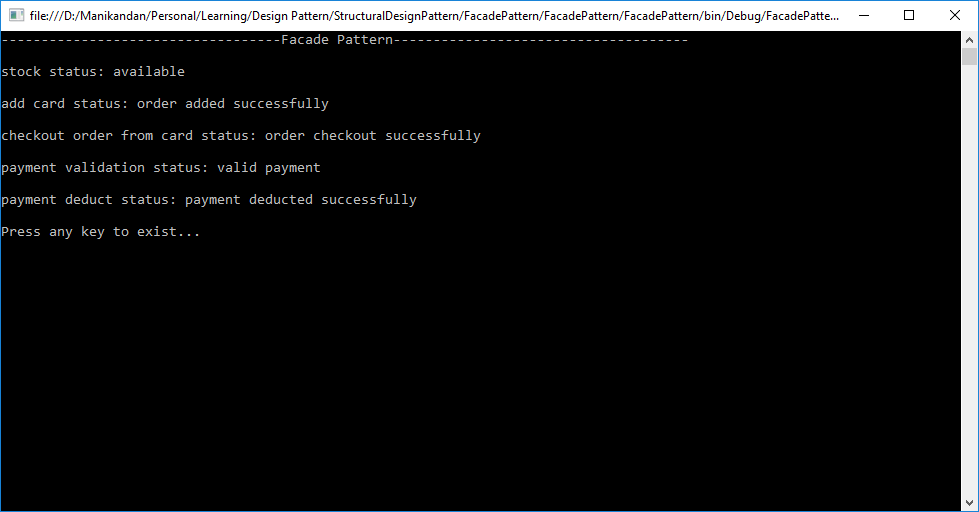
Final Output:


Click here to download sample program

If you like this post, Kindly share your valuable comments.

Wednesday, 13 December 2017

Decorator Pattern


  •  Decorator pattern attach additional functionalities or responsibility to an existing object at the runtime.
  •  It adds new behaviour to an individual object without affecting other objects of the same class.
  •  New behaviour or functionalities can be added dynamically at the run time
Example:

Consider you are developing student management application. First you’re creating
basic responsibility to handle and print information like name, age, gender & grade etc…

After a while you have got a new requirement to add functionality to maintain lab reports
for science students. Basically how will do this? May be extend the Student class to create
ScienceStudent subclass for this responsibility. It’s good enough for this requirement.

You have got another requirement to add functionality to maintaining game reports for
sports students. Again you may want to extend the Student class to create a
SportsStudent subclass for this responsibility.

You have got another requirement to maintain information of the student who is studying
science and also playing sports. You will have to maintain lab reports, game reports
along with name, age, gender and grade. You have already created two subclass's for
science students and sports students, but there is no way you can reuse them in this
scenario. You are left with no option but to create a subclass for ScienceSportsStudent and
this is a problem. How many subclasses you keep creating? Decorator pattern solves this
problem.

Sample Demo Diagram:


UML Diagram:


Drawbacks:

  • Decorators can cause issues if the client relies heavily on the components concrete type
  •  Decorators can complicate the process of instantiating the component because you not only have to instantiate the component but wrap it in a number of decorators
  •  It can be complicated to have decorators keep track of other decorators because to look back into multiple layers of the decorator chain starts to push the decorator pattern beyond it’s true intent

Sample Demo Program:

         The following participant are involved in given program

1.       Component – This is the base interface of actual or concrete object. In this object additional functionalities will be added dynamically. In implementation, it could be an abstract class or interface
2.       Concrete Component: This is the actual object in which additional functionality will be added. In implementation, it would implement or extend the component
3.       Decorator – This is the interface of all the dynamic functionalities that would be added to the component. It maintains reference of the component object and defines interface for new dynamic functionalities.
4.       Concrete Decorator – This will add dynamic functionalities to the component.


Entire Code Structure:

        1
  2
  3
  4
  5
  6
  7
  8
  9
 10
 11
 12
 13
 14
 15
 16
 17
 18
 19
 20
 21
 22
 23
 24
 25
 26
 27
 28
 29
 30
 31
 32
 33
 34
 35
 36
 37
 38
 39
 40
 41
 42
 43
 44
 45
 46
 47
 48
 49
 50
 51
 52
 53
 54
 55
 56
 57
 58
 59
 60
 61
 62
 63
 64
 65
 66
 67
 68
 69
 70
 71
 72
 73
 74
 75
 76
 77
 78
 79
 80
 81
 82
 83
 84
 85
 86
 87
 88
 89
 90
 91
 92
 93
 94
 95
 96
 97
 98
 99
100
101
102
103
104
105
106
107
108
109
110
111
112
113
114
using System;
namespace DecoratorPattern
{
    /// <summary>
    /// Student Component
    /// </summary>
    public abstract class Student
    {
        public abstract string DisplayStudentInformation();
    }

    /// <summary>
    /// concrete component for student
    /// </summary>
    public class StudentConcrete : Student
    {
        public string Name { get; set; }
        public int Age { get; set; }
        public string Gender { get; set; }
        public string Grade { get; set; }

        public override string DisplayStudentInformation()
        {
            string whois = ((Gender == "Male") ? "He" : "She");
            return Name + ". " + whois + " is " + Age + " years old. " + "Grade is " + Grade + ".";
        }
    }

    /// <summary>
    /// base student decorator for all dynamic functionalities
    /// </summary>
    public class StudentDecorator: Student
    {
        Student baseStudent = null;
        protected StudentDecorator(Student s)
        {
            baseStudent = s;
        }
        public override string DisplayStudentInformation()
        {
            string baseStudentInformation = baseStudent.DisplayStudentInformation();
            return baseStudentInformation;
        }
    }

    /// <summary>
    /// science student concrete decorator for dynamic functionality
    /// </summary>
    public class ScienceStudentDecorator : StudentDecorator
    {
        public string Labs { get; set; }
        public ScienceStudentDecorator(Student baseStudent) : base(baseStudent) { }

        public override string DisplayStudentInformation()
        {
            var result = base.DisplayStudentInformation();
            result = result + " Labs are " + Labs + ".";
            return result;
        }
    }

    /// <summary>
    /// sports student concrete decorator for dynamic functionality
    /// </summary>
    public class SportsStudentDecorator : StudentDecorator
    {
        public string Games { get; set; }
        public SportsStudentDecorator(Student baseStudent) : base(baseStudent) { }

        public override string DisplayStudentInformation()
        {
            var result = base.DisplayStudentInformation();
            result = result + " Games are " + Games + ".";
            return result;
        }
    }

    class Program
    {
        static void Main(string[] args)
        {
            //normal student
            StudentConcrete stdKumar = new StudentConcrete { Name = "Kumar", Age = 10, Gender = "Male", Grade = "B" };
            var stdKumarInformation = stdKumar.DisplayStudentInformation();
            Console.WriteLine("---------------------Normal Student--------------------");
            Console.WriteLine(stdKumarInformation);

            //science student
            StudentConcrete stdKavitha = new StudentConcrete { Name = "Kavitha", Age = 10, Gender = "FeMale", Grade = "A" };
            ScienceStudentDecorator stdScienceKavitha = new ScienceStudentDecorator(stdKavitha) { Labs = "Computer Science, Biology" };
            var stdScienceKavithaInformation = stdScienceKavitha.DisplayStudentInformation();
            Console.WriteLine("\n---------------------Science Student--------------------");
            Console.WriteLine(stdScienceKavithaInformation);

            //games student
            StudentConcrete stdArun = new StudentConcrete { Name = "Arun", Age = 10, Gender = "Male", Grade = "C" };
            SportsStudentDecorator stdSportArun = new SportsStudentDecorator(stdArun) { Games = "Cricket, Football" };
            var stdSportsArunInformation = stdSportArun.DisplayStudentInformation();
            Console.WriteLine("\n---------------------Sport Student--------------------");
            Console.WriteLine(stdSportsArunInformation);

            //science & sports student
            StudentConcrete stdMani = new StudentConcrete { Name = "Mani", Age = 10, Gender = "Male", Grade = "A" };
            ScienceStudentDecorator stdScienceMani = new ScienceStudentDecorator(stdMani) { Labs = "Computer Science, Biology" };
            SportsStudentDecorator stdSportScienceMani = new SportsStudentDecorator(stdScienceMani) { Games = "Cricket, Football" };
            var stdSportScienceManiInformation = stdSportScienceMani.DisplayStudentInformation();
            Console.WriteLine("\n---------------------Science & Sport Student--------------------");
            Console.WriteLine(stdSportScienceManiInformation);

            Console.Write("\nPress any key to exist...");
            Console.ReadKey();
        }
    }
}

Final Output:


Click here to download sample program

If you like this post. Kindly share your valuable comments.

Friday, 6 October 2017

Structural Design Pattern

Creational Design Pattern

Composite Pattern

  • The Composite Pattern is a Structural Design Pattern, it also known as partitioning design pattern. It describes a group of objects that is treated the same way as a single instance of the same type of object.
  • It composes objects in terms of a tree structure to represent part as well as whole hierarchy. Client treat individual objects and compositions of objects uniformly.

    Example:

    Consider you are creating Employee Management Application. Normally organization have hierarchy of CEO -> Director -> Managers -> Team Leader -> Developer. The owner of organization want to know all employee detail information. In normal application we have maintain lot of classes and subclass to get those of information. To overcome this problem composite pattern come to this place. It work as common interface component ((i.e.) IEmployee) and leaf tree node ((i.e.) Employee) and single full control composite class which is act as intermediator of component and leaf tree node.

    Sample Demo Diagram:


    UML Diagram:


    Drawbacks:

    ·         It easy to add new kinds of components to your collection as long as they support similar programming interface.

    ·         It’s harder to restrict the components of a composite.

    Sample Demo Program:

    The following participant are involved in given program
    1.       Component – It’s declare the interface for objects in the composition and for accessing and managing its child components. It also implement default behavior for the interface common to all classes as appropriate.
    2.       Composite – It’s define components behaviors and implement child related operations ((i.e.) CRUD Operation) in the component interface
    3.        Leaf – It’s defines behavior for primitive objects in the composition.
    4.       Client – It’s manipulates the objects in the composition through the component interface.

    Entire Code Structure:

      1
      2
      3
      4
      5
      6
      7
      8
      9
     10
     11
     12
     13
     14
     15
     16
     17
     18
     19
     20
     21
     22
     23
     24
     25
     26
     27
     28
     29
     30
     31
     32
     33
     34
     35
     36
     37
     38
     39
     40
     41
     42
     43
     44
     45
     46
     47
     48
     49
     50
     51
     52
     53
     54
     55
     56
     57
     58
     59
     60
     61
     62
     63
     64
     65
     66
     67
     68
     69
     70
     71
     72
     73
     74
     75
     76
     77
     78
     79
     80
     81
     82
     83
     84
     85
     86
     87
     88
     89
     90
     91
     92
     93
     94
     95
     96
     97
     98
     99
    100
    101
    102
    103
    104
    105
    106
    107
    108
    109
    110
    111
    112
    113
    114
    115
    116
    117
    118
    119
    120
    121
    122
    123
    124
    125
    126
    127
    128
    129
    130
    /**
     * Author : Manikandan M
     * Description: Sample program for composite pattern
     */
    using System;
    using System.Collections.Generic;
    namespace CompositePattern
    {
        class Program
        {
            /// <summary>
            /// 'Component' Treenode
            /// </summary>
            interface IEmployee
            {
                void DisplayEmployeeDetails();
            }
    
            /// <summary>
            /// 'Leaf' Class
            /// </summary>
            class Employee : IEmployee
            {
                private long empId;
                private string name;
                private string designation;
                private string experience;
    
                /// <summary>
                /// Get employee details with help of parameter constructor
                /// </summary>
                /// <param name="empId"></param>
                /// <param name="name"></param>
                /// <param name="designation"></param>
                /// <param name="experience"></param>
                public Employee(long empId, string name, string designation, string experience)
                {
                    this.empId = empId;
                    this.name = name;
                    this.designation = designation;
                    this.experience = experience;
                }
    
                /// <summary>
                /// Display employee details
                /// </summary>
                public void DisplayEmployeeDetails()
                {
                    Console.WriteLine(string.Format("Emp Id: {0}, Employee Name: {1}, Designation: {2}, Experience: {3}\n", empId, name, designation, experience));
                }
            }
    
            /// <summary>
            /// 'Composite' Class
            /// </summary>
            class Administrator : IEmployee
            {
                private List<IEmployee> employeeList = new List<IEmployee>();
    
                /// <summary>
                /// Add new employee
                /// </summary>
                /// <param name="emp"></param>
                public void addEmployee(IEmployee emp)
                {
                    employeeList.Add(emp);
                }
    
                /// <summary>
                /// Remove existing employee
                /// </summary>
                /// <param name="emp"></param>
                public void removeEmployee(IEmployee emp)
                {
                    employeeList.Remove(emp);
                }
    
                /// <summary>
                /// display entire employee details
                /// </summary>
                public void DisplayEmployeeDetails()
                {
                    foreach(IEmployee emp in employeeList)
                    {
                        emp.DisplayEmployeeDetails();
                    }
                }
            }
    
            //client or owner
            static void Main(string[] args)
            {
                Administrator administrator = new Administrator();
                
                //add ceo information
                Employee ceo = new Employee(100, "Kumar", "CEO", "24 Years");
                administrator.addEmployee(ceo);
    
                //add director information
                Employee hrDirector = new Employee(101, "Vimal", "HR Director", "20 Years");
                Employee itDirector = new Employee(102, "Naveen", "IT Director", "18 Years");
                Employee salesDirector = new Employee(103, "Pavan", "Sales Director", "22 Years");
                administrator.addEmployee(hrDirector);
                administrator.addEmployee(itDirector);
                administrator.addEmployee(salesDirector);
    
                //add manager information
                Employee manager_1 = new Employee(104, "Ravi", "Manager", "15 Years");
                Employee manager_2 = new Employee(105, "Mani", "Manager", "13 Years");
                administrator.addEmployee(manager_1);
                administrator.addEmployee(manager_2);
    
                //add team leader information
                Employee teamleader_1 = new Employee(106, "Kannan", "Team Leader", "10 Years");
                Employee teamleader_2 = new Employee(107, "Kumaran", "Team Leader", "8 Years");
                administrator.addEmployee(teamleader_1);
                administrator.addEmployee(teamleader_2);
    
                //add developer information
                Employee developer_1 = new Employee(108, "Kathir", "Developer", "7 Years");
                Employee developer_2 = new Employee(109, "Arun Pandiyan", "Developer", "5 Years");
                administrator.addEmployee(developer_1);
                administrator.addEmployee(developer_2);
    
                administrator.DisplayEmployeeDetails();
                Console.Write("Press any key to exist...");
                Console.ReadKey();
            }
        }
    }
    

    Final Output:


    Click here to download sample program

    If you like this post. Kindly share your valuable comments.

Followers