
- The Adapter Pattern is a Structural Design Pattern, its work as a bridge between two incompatible interfaces.
- It’s involves a single class which is responsible
to join functionalities of independent or incompatible interfaces.
Example:Consider you are creating video player application. First release of video player application can play AVI & WMV files only.After a while, your application becomes so popular that you get huge end user request to support other video file format as well.It’s good about product but how about the code? In this case you could rewrite your code to support other video format. To overcome this problem adapter pattern come to this place. It works as a bridge between two incompatible video formats ((i.e.) older video format & new video format which is expect from end users). It’s allows reusability of existing functionalities. It couldn’t modify existing functionality.
Sample Demo Diagram:
UML Diagram:
Drawbacks:
It’s harder to override Adaptee interface behaviour. It will require subclassing Adaptee and making Adapter refer to the subclass rather than the Adaptee Interface itself.
It unnecessarily increases the size of the code as class inheritance is less used and lot of code is needlessly duplicated between classes.
Sample Demo Program:
The following participants are involved in given program
1. Target Interface – This is the interface expected by the client
2. Adapter – This is a wrapper over Adaptee class which implements the Target Interface. It receives calls from the client and translates that request to one/ multiple adaptee calls using Adaptee Interface
3. Adaptee Interface – This is existing interface which is wrapped by Adapter. Client wants to interact with Adaptee but cannot interact directly because Adaptee interface is incompatible with Target Interface.
4. Client – Client will interact with Adapter using Target Interface
Entire Code Structure:
     1
  2
  3
  4
  5
  6
  7
  8
  9
 10
 11
 12
 13
 14
 15
 16
 17
 18
 19
 20
 21
 22
 23
 24
 25
 26
 27
 28
 29
 30
 31
 32
 33
 34
 35
 36
 37
 38
 39
 40
 41
 42
 43
 44
 45
 46
 47
 48
 49
 50
 51
 52
 53
 54
 55
 56
 57
 58
 59
 60
 61
 62
 63
 64
 65
 66
 67
 68
 69
 70
 71
 72
 73
 74
 75
 76
 77
 78
 79
 80
 81
 82
 83
 84
 85
 86
 87
 88
 89
 90
 91
 92
 93
 94
 95
 96
 97
 98
 99
100
101
102
103
104
105
106
107
108
109
110
111
112
113
114
115
116
117
118
using System;

namespace AdapterPattern
{
    class Program
    {
        //'ITarget' Interface
        interface IVideoPlayer
        {
            void PlayVideo(string videoType, string fileName);
        }

        //'Adaptee' Interface which is act as additional feature interface
        interface IAdditionalVideoPlayer
        {
            void PlayFlv(string fileName);
            void PlayMpg(string fileName);
        }

        //'Adaptee' class 1
        public class FlvPlayer : IAdditionalVideoPlayer
        {
            public void PlayFlv(string fileName)
            {
                Console.WriteLine("Playing flv File. Name: " + fileName);
            }

            public void PlayMpg(string fileName)
            {
                //do nothing
            }
        }

        //'Adaptee' class 2
        public class MpgPlayer : IAdditionalVideoPlayer
        {
            public void PlayFlv(string fileName)
            {
                //do nothing
            }

            public void PlayMpg(string fileName)
            {
                Console.WriteLine("Playing mpg File. Name: " + fileName);
            }
        }

        //'Adapter' Class
        class VideoAdapter : IVideoPlayer
        {
            IAdditionalVideoPlayer additionalVideoPlayer;

            public VideoAdapter(string videoType)
            {
                if (videoType.Contains("flv"))
                {
                    additionalVideoPlayer = new FlvPlayer();
                } else if (videoType.Contains("mpg"))
                {
                    additionalVideoPlayer = new MpgPlayer();
                }
            }

            public void PlayVideo(string videoType, string fileName)
            {
                if (videoType.Contains("flv"))
                {
                    additionalVideoPlayer.PlayFlv(fileName);
                } else if (videoType.Contains("mpg"))
                {
                    additionalVideoPlayer.PlayMpg(fileName);
                }
            }
        }

        //'Target' class implementing the ITarget interface
        class VideoPlayer : IVideoPlayer
        {
            VideoAdapter videoAdapter;

            public void PlayVideo(string videoType, string fileName)
            {
                //inbuild support video files format
                if (videoType.Contains("avi") || videoType.Contains("wmv"))
                {
                    Console.WriteLine(string.Format("Playing {0} file. Name: {1}", videoType, fileName));
                }

                //videoAdapter is providing support to play other file formats
                else if (videoType.Contains("flv") || videoType.Contains("mpg"))
                {
                    videoAdapter = new VideoAdapter(videoType);
                    videoAdapter.PlayVideo(videoType, fileName);
                }

                else
                {
                    Console.WriteLine("Invalid Video " + videoType + "file format not supported");
                }
            }
        }

        //'Client'
        static void Main(string[] args)
        {
            VideoPlayer videoPlayer = new VideoPlayer();

            Console.WriteLine("------------------------------------Adapter Pattern for Video Player-----------------------------\n");
            videoPlayer.PlayVideo("avi", "bahubali-1.avi");
            videoPlayer.PlayVideo("wmv", "bahubali-2.wmv");
            videoPlayer.PlayVideo("flv", "wonder woman.flv");
            videoPlayer.PlayVideo("mpg", "spider man.mpg");

            Console.Write("Press any key to exist...");
            Console.ReadKey();
        }
    }
}
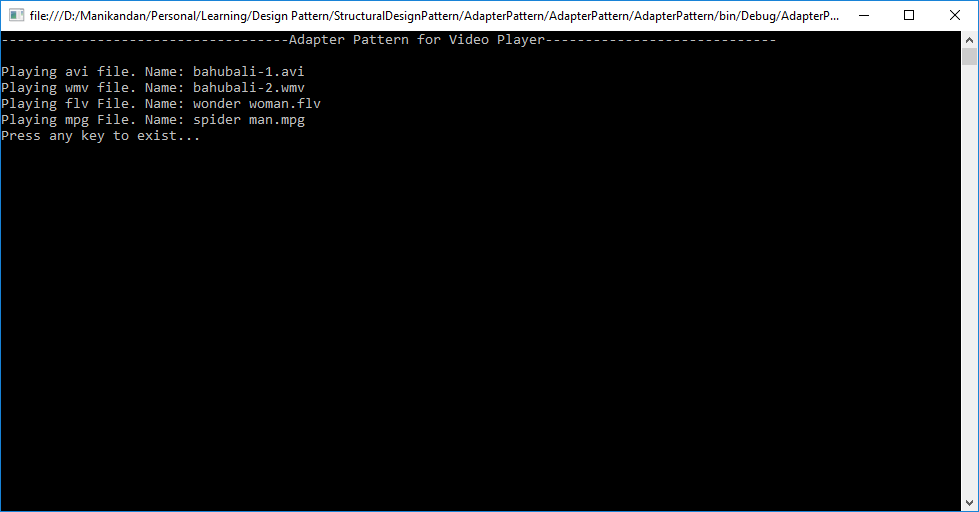
Final Output: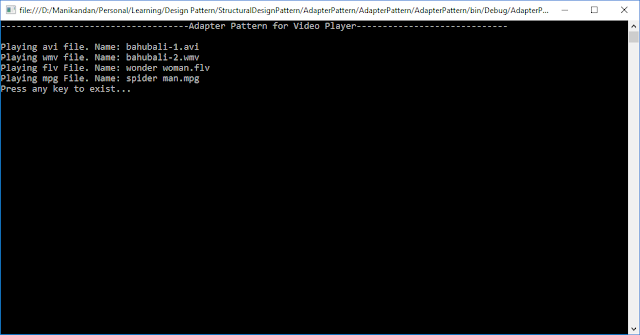
Click here to download sample program
If you like this post. Kindly share your valuable comments
Thursday, 28 September 2017
Adapter Pattern


Wednesday, 27 September 2017
What is Structural Design Pattern?
- Structural design patterns are responsible for how classes and objects are structured.
- It’s mainly focus on, how the classes inherits from each other and how they are composed from other classes.
- It’s simple way to realize relationships between different objects.
Tuesday, 26 September 2017
Prototype Pattern
- The Prototype Pattern is a Creational Design Pattern, It’s used to Clone / Duplicate the object.
- It’s
allows us to hide the complexity of making new instances from the client. The concept
is to copy an existing object rather than creating a new instance from scratch.
The existing object act as a prototype. The newly copied object may change same
properties only if required. This approach saves costly resources and time and
resolved problem related with duplicating a class.
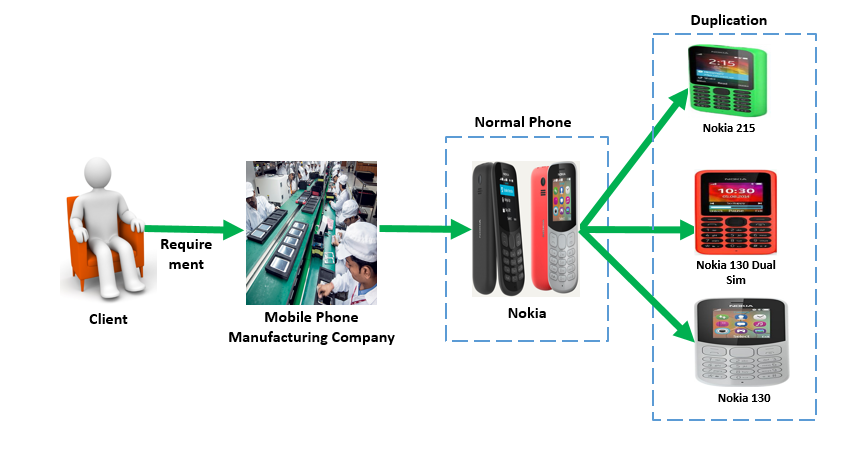
Example:Consider you are creating mobile product management application. The client want to ask same mobile product with different features. In this scenario, we copy new product from existing product just by changing properties based on client expectation.
Sample Demo Diagram:
UML Diagram:

Drawbacks:
·
To making the copy of an object that can be
complicated sometimes.
·
Classes that have circular references to other
classes cannot really be cloned.
Sample Demo Program:
The following participants are
involved in given program
1.
Prototype
– It’s an interface which is used for the types of object that can be cloned
itself.
2.
ConcretePrototype
– it’s a class which implements the prototype interface for cloning itself.
3.
Client
– creates a new object by asking a prototype to clone itself.
Entire Code Structure:
1 2 3 4 5 6 7 8 9 10 11 12 13 14 15 16 17 18 19 20 21 22 23 24 25 26 27 28 29 30 31 32 33 34 35 36 37 38 39 40 41 42 43 44 45 46 47 48 49 50 51 52 53 54 55 56 57 58 59 60 61 62 63 64 65 66 67 68 69 70 71 72 73 74 75 76 77 78 79 80 81 82 83 84 85 86 87 88 89 90 91 92 93 94 95 96 97 | using System; namespace PrototypePattern { class Program { //'IPrototype' Interface interface IMobilePhone { IMobilePhone Clone(); string GetMobilePhoneDetails(); } //'ConcretePrototype' class class MobilePhone : IMobilePhone { public string Name { get; set; } public string OperatingSystem { get; set; } public string InternalMemory { get; set; } public string RearCamera { get; set; } public string ScreenSize { get; set; } public string ExpandableMemory { get; set; } public string BatteryCapacity { get; set; } public string Resolution { get; set; } public string Colour { get; set; } public IMobilePhone Clone() { //Shallow Copy: every reference type objects are duplicated return (IMobilePhone)MemberwiseClone(); } public string GetMobilePhoneDetails() { return string.Format("Name : {0}\nOpeartingSystem : {1}\nInternal Memory : {2}\nRear Camera : {3}\n" + "ScreenSize : {4}\nExpandableMemory : {5}\nBatteryCapacity : {6}\n" + "Resolution : {7}\nColour : {8}", Name, OperatingSystem, InternalMemory, RearCamera, ScreenSize, ExpandableMemory, BatteryCapacity, Resolution, Colour); } } //'Client' static void Main(string[] args) { MobilePhone mobilePhone = new MobilePhone(); mobilePhone.OperatingSystem = " Nokia OS Series 30"; mobilePhone.InternalMemory = "250 MB"; mobilePhone.ExpandableMemory = "32 GB"; //Clone mobile phone object with Clone method //Clone Nokia 215 Mobile Phone Object with help of default value from Original object MobilePhone mobilePhone_Nokia215 = (MobilePhone)mobilePhone.Clone(); mobilePhone_Nokia215.Name = "Nokia 215"; mobilePhone_Nokia215.RearCamera = "0.3 MP"; mobilePhone_Nokia215.ScreenSize = "2.4 Inches"; mobilePhone_Nokia215.BatteryCapacity = "1100 mAh"; mobilePhone_Nokia215.Resolution = "240 x 320 pixels"; mobilePhone_Nokia215.Colour = "Green"; Console.WriteLine("------------------Nokia 215 Mobile Phone Details-------------------"); Console.WriteLine(mobilePhone_Nokia215.GetMobilePhoneDetails()); //Clone Nokia 130 Dual SIM Mobile Phone Object with help of default value from Original object MobilePhone mobilePhone_Nokia130DualSim = (MobilePhone)mobilePhone.Clone(); mobilePhone_Nokia130DualSim.Name = "Nokia 130 Dual SIM"; mobilePhone_Nokia130DualSim.RearCamera = "No"; mobilePhone_Nokia130DualSim.ScreenSize = "1.8 Inches"; mobilePhone_Nokia130DualSim.BatteryCapacity = "1200 mAh"; mobilePhone_Nokia130DualSim.Resolution = "128 x 160 pixels"; mobilePhone_Nokia130DualSim.Colour = "Red"; Console.WriteLine("------------------Nokia 130 Dual SIM Mobile Phone Details-------------------"); Console.WriteLine(mobilePhone_Nokia130DualSim.GetMobilePhoneDetails()); //Clone Nokia 130 Mobile Phone Object with help of default value from Original object MobilePhone mobilePhone_Nokia130 = (MobilePhone)mobilePhone.Clone(); mobilePhone_Nokia130.Name = "Nokia 130"; mobilePhone_Nokia130.RearCamera = "No"; mobilePhone_Nokia130.ScreenSize = "1.8 Inches"; mobilePhone_Nokia130.BatteryCapacity = "1020 mAh"; mobilePhone_Nokia130.Resolution = "128 x 160 pixels"; mobilePhone_Nokia130.Colour = "Red"; Console.WriteLine("------------------Nokia 130 Mobile Phone Details-------------------"); Console.WriteLine(mobilePhone_Nokia130.GetMobilePhoneDetails()); Console.Write("Press any key to exist..."); Console.ReadKey(); } } } |
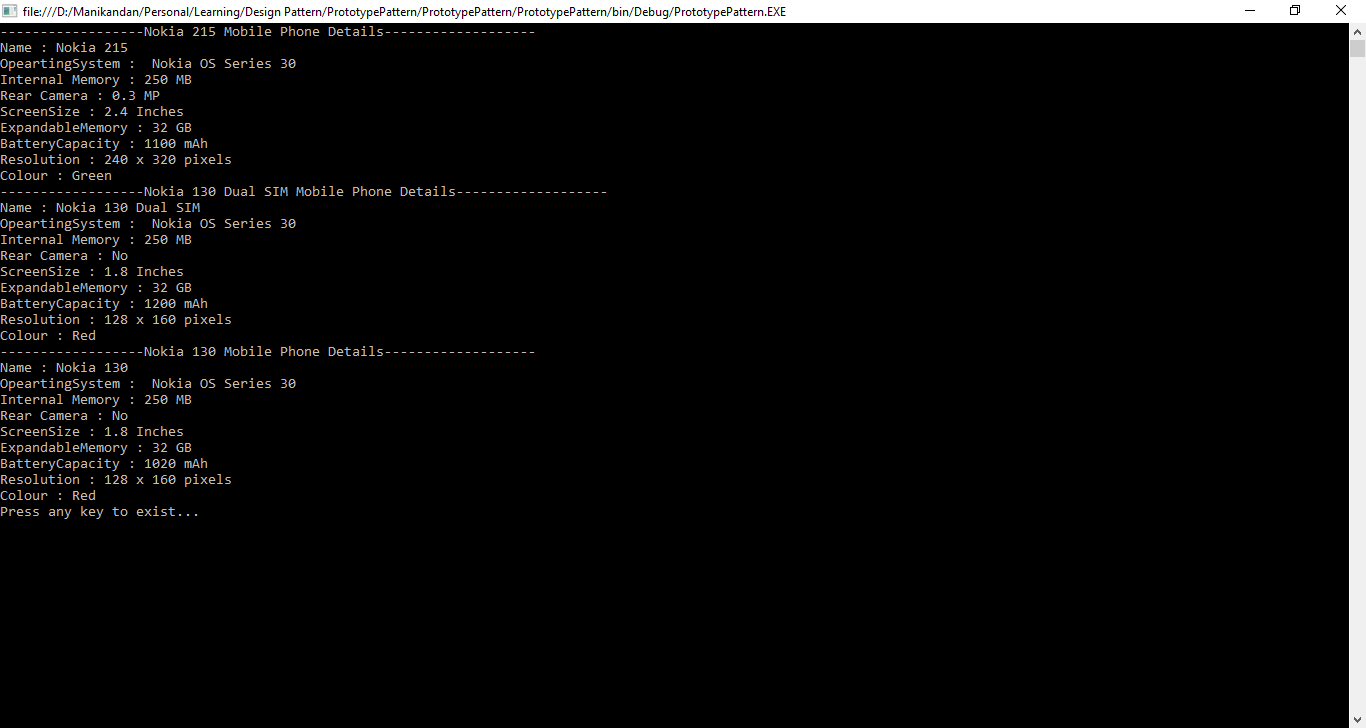
Final Output:
Monday, 25 September 2017
Builder Pattern
- The Builder Design Pattern is a Creational Design Pattern, It’s build a complex object by using step by step approach and finally step will return the object. The same build process can create different object.
- Builder is independent from the objects creation process.
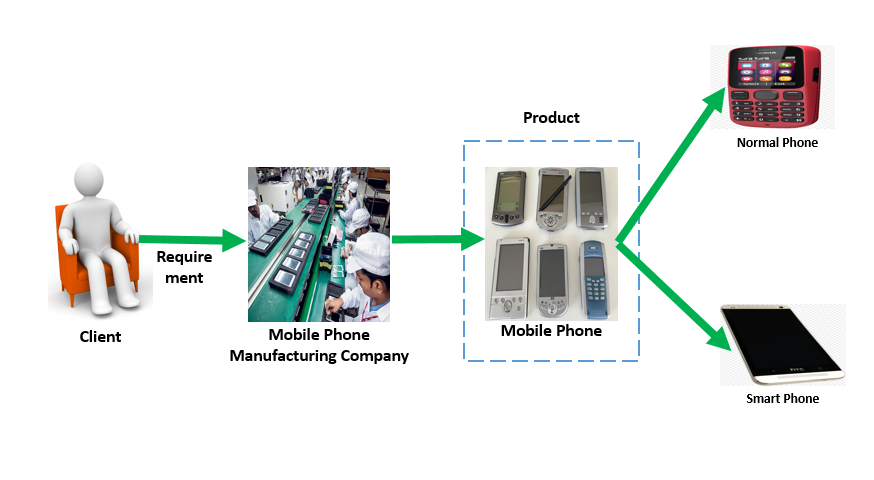
Example:Consider you are creating mobile product management application. The client want to ask different kind of mobile products like normal & smart phone. First you can construct mobile phone. Mobile phone is the final end product (object). It build different mobile product like Normal & Smart Phone based on many steps like Operating System Installation, Internal Memory Allocation, Allocate Connectivity, Allocate Screen Type and so on…..Finally the whole mobile phone object is returned.
Sample Demo Diagram:
UML Diagram:
Drawbacks:· It’s requires code duplication as builder need to copy all fields or properties from original· Requires creating a separate ConcreteBuilder for each different type of product.· Requires the builder classes to be mutable.
Sample Demo Program:The following participants are involved in given program
1. Builder – It’s an interface which is used to declare all the steps to create a product2. ConcreteBuilder – It’s a class which implements or define the Builder interface to create complex kind of product3. Product – It’s main object that will be constructed4. Director – It’s used to construct an object using the Builder Interface.
Entire Code Structure:1 2 3 4 5 6 7 8 9 10 11 12 13 14 15 16 17 18 19 20 21 22 23 24 25 26 27 28 29 30 31 32 33 34 35 36 37 38 39 40 41 42 43 44 45 46 47 48 49 50 51 52 53 54 55 56 57 58 59 60 61 62 63 64 65 66 67 68 69 70 71 72 73 74 75 76 77 78 79 80 81 82 83 84 85 86 87 88 89 90 91 92 93 94 95 96 97 98 99 100 101 102 103 104 105 106 107 108 109 110 111 112 113 114 115 116 117 118 119 120 121 122 123 124 125 126 127 128 129 130 131 132 133 134 135 136 137 138 139 140 141 142 143 144 145 146 147 148 149 150 151 152 153 154 155 156 157 158 159 160 161 162 163 164 165 166 167 168 169 170 171 172 173 174 175 176 177 178 179 180 181 182 183 184 185 186 187 188 189 190 191 192 193 194 195 196 197 198 199 200 201 202 203 204 205 206 207 208 209 210 211 212 213 214 215 216 217 218 219 220 221 222 223 224 225 226 227 228 229 230 231 232 233 234 235 236 237 238 239 240 241 242 243 244 245 246 247 248 249 250 251 252 253 254 255 256 257 258 259 260 261 262 263 264 265 266 267 268 269 270 271 272 273 274 275
using System; namespace BuilderPattern { class Program { //Identifying various parts with help of enums helper public enum OperatingSystem { Android, Symbian_OS, Windows_Phone, Windows_Mobile, Nokia_Asha, Aliyun_OS } public enum Battery { mAH_2500, mAH_4000, mAH_4500, mAH_5000 } public enum InternalMemory { IM_250_MB, //Internal Memory 250 MB IM_4_GB, IM_8_GB, IM_16_GB } public enum Weight { W_100_g, //Weight 100 grams W_146_g, W_200_g, W_250_g } public enum WirelessCommunication { Bluetooth, WiFi_Hotspot } public enum Connectivity { GSM, CDMA, LTE, TDD } public enum ScreenType { Touch, Non_Touch } public enum Colour { Black, Green, Yellow, White, Gold } //'Product' Class class MobilePhone { public string ModelNumber { get; set; } public string PhoneName { get; set; } public OperatingSystem OperatingSystem { get; set; } public InternalMemory InternalMemory { get; set; } public Weight Weight { get; set; } public Battery Battery { get; set; } public string WirelessCommunication { get; set; } public string Connectivity { get; set; } public string Camera { get; set; } public Colour Colour { get; set; } public ScreenType ScreenType { get; set; } public void DisplayPhoneDetails() { Console.WriteLine(string.Format("Model Number : {0}\nPhone Name : {1}\nOperating System : {2}\n" + "Internal Memory : {3}\nWeight : {4}\nBattery : {5}\nWireless Communication : {6}\n" + "Connectivity : {7}\nCamera : {8}\nColour : {9}\nScreen Type : {10}", ModelNumber, PhoneName, OperatingSystem, InternalMemory, Weight, Battery, WirelessCommunication, Connectivity, Camera, Colour, ScreenType)); } } //'Builder' Interface interface IPhoneBuilder { void AddOS(); void AddInternalMemory(); void AddWeight(); void AddBattery(); void AddWirelessCommunication(); void AddConnectivity(); void AddCamera(); void AddColour(); void AddScreenType(); MobilePhone GetPhone(); } //'ConcreteBuilder' class - Implements builder interface class NormalPhoneBuilder : IPhoneBuilder { MobilePhone Phone = new MobilePhone(); public NormalPhoneBuilder(string modelNumber, string phoneName) { Phone.ModelNumber = modelNumber; Phone.PhoneName = phoneName; } public void AddOS() { Phone.OperatingSystem = OperatingSystem.Symbian_OS; } public void AddInternalMemory() { Phone.InternalMemory = InternalMemory.IM_250_MB; } public void AddWeight() { Phone.Weight = Weight.W_100_g; } public void AddBattery() { Phone.Battery = Battery.mAH_2500; } public void AddWirelessCommunication() { Phone.WirelessCommunication = WirelessCommunication.Bluetooth.ToString(); } public void AddConnectivity() { Phone.Connectivity = Connectivity.CDMA.ToString(); } public void AddCamera() { Phone.Camera = "Not Available"; } public void AddColour() { Phone.Colour = Colour.Black; } public void AddScreenType() { Phone.ScreenType = ScreenType.Non_Touch; } public MobilePhone GetPhone() { return Phone; } } //'ConcreteBuilder' class - Implements builder interface class SmartPhoneBuilder : IPhoneBuilder { MobilePhone Phone = new MobilePhone(); public SmartPhoneBuilder(string modelNumber, string phoneName) { Phone.ModelNumber = modelNumber; Phone.PhoneName = phoneName; } public void AddOS() { Phone.OperatingSystem = OperatingSystem.Windows_Mobile; } public void AddInternalMemory() { Phone.InternalMemory = InternalMemory.IM_8_GB; } public void AddWeight() { Phone.Weight = Weight.W_200_g; } public void AddBattery() { Phone.Battery = Battery.mAH_4500; } public void AddWirelessCommunication() { Phone.WirelessCommunication = string.Format("{0},{1}", WirelessCommunication.Bluetooth.ToString(), WirelessCommunication.WiFi_Hotspot.ToString()); } public void AddConnectivity() { Phone.Connectivity = string.Format("{0},{1},{2}",Connectivity.CDMA.ToString(), Connectivity.GSM.ToString(), Connectivity.LTE.ToString()); } public void AddCamera() { Phone.Camera = "13 MP"; //13 Mega Pixcel } public void AddColour() { Phone.Colour = Colour.Gold; } public void AddScreenType() { Phone.ScreenType = ScreenType.Touch; } public MobilePhone GetPhone() { return Phone; } } //'Director' class - To constract mobile phone class MobilePhoneManufacturer { public void BuildMobilePhone(IPhoneBuilder phoneBuilder) { phoneBuilder.AddOS(); phoneBuilder.AddInternalMemory(); phoneBuilder.AddWeight(); phoneBuilder.AddBattery(); phoneBuilder.AddWirelessCommunication(); phoneBuilder.AddConnectivity(); phoneBuilder.AddConnectivity(); phoneBuilder.AddCamera(); phoneBuilder.AddColour(); phoneBuilder.AddScreenType(); } } static void Main(string[] args) { //Create 'Director' MobilePhoneManufacturer mobilePhoneManufacturer = new MobilePhoneManufacturer(); //Build Normal Mobile Phone IPhoneBuilder normalPhoneBuilder = new NormalPhoneBuilder("Normal_001", "Nokia 1600"); mobilePhoneManufacturer.BuildMobilePhone(normalPhoneBuilder); MobilePhone NormalMobilePhone = normalPhoneBuilder.GetPhone(); //Display Details Console.WriteLine("----------------------Normal Mobile Phone Details-----------------"); NormalMobilePhone.DisplayPhoneDetails(); //Build Smart Phone Console.WriteLine("\n----------------------Smart Phone Details-----------------"); IPhoneBuilder smartPhoneBuilder = new SmartPhoneBuilder("SmartPhone_001", "Nokia Asha"); mobilePhoneManufacturer.BuildMobilePhone(smartPhoneBuilder); MobilePhone SmartPhone = smartPhoneBuilder.GetPhone(); //Display Details SmartPhone.DisplayPhoneDetails(); Console.Write("Press any key to exist..."); Console.ReadKey(); } } }
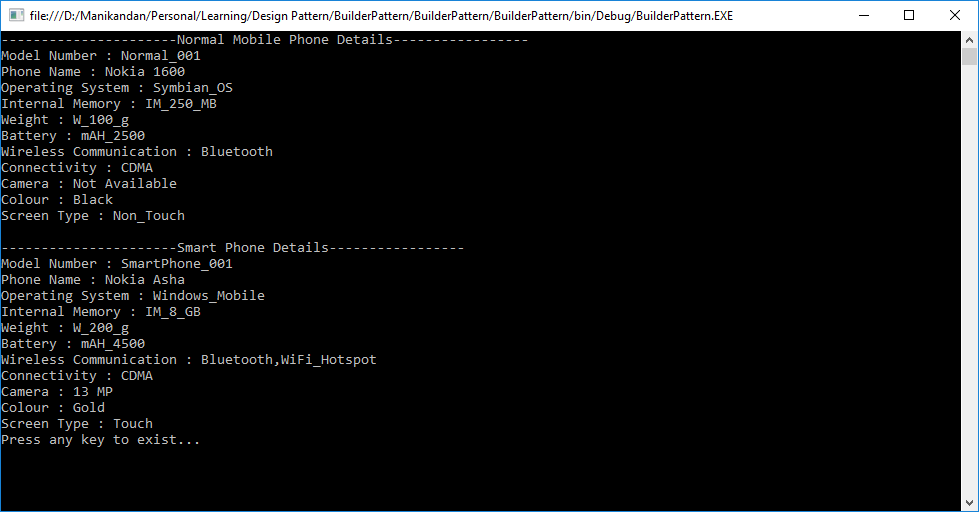
Final Output: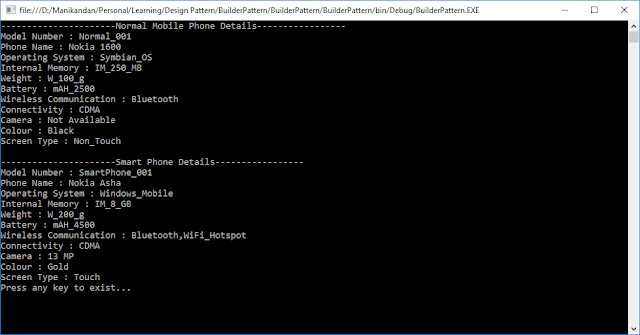
Click here to download sample program
If you like this post. Kindly share your valuable comments.

Thursday, 14 September 2017
How to achieve grid CRUD Operation in angular 4 ?
Implementation Details:
The application is implemented with help of sample JSON array not using any external HTTP service. This application for your reference only. if you want http service data , you need to modify your code based on your requirement.
Step 1: you need to set up your development environment before use this project.
Step 2: Click here to download demo project and extract & open the source file.
Source File Reference Path Screenshot:

Step 3: Then type cd source file path ((i.e.) cd C:/anguar4gridexampe) in comment prompt
Step 4: Then Install package in your project. just type npm install in comment prompt. it would take some time to install all required package in your project.
Step 5: Once installation done. Then type npm start (or) npm serve to run your project
Step 6: your project not automatically run in your browser window. by default it take 4200 port to run. you are project run in http://localhost:4200/
Demo Output:

If you like this post, kindly share your valuable comments
The application is implemented with help of sample JSON array not using any external HTTP service. This application for your reference only. if you want http service data , you need to modify your code based on your requirement.
Step 1: you need to set up your development environment before use this project.
- Install Node.Js if they are not install your machine.
- Verify you are running latest node and npm [comment: node -v and npm -v]
- Then install the Angular CLI Globally [npm install -g angular/cli]
Step 2: Click here to download demo project and extract & open the source file.
Source File Reference Path Screenshot:
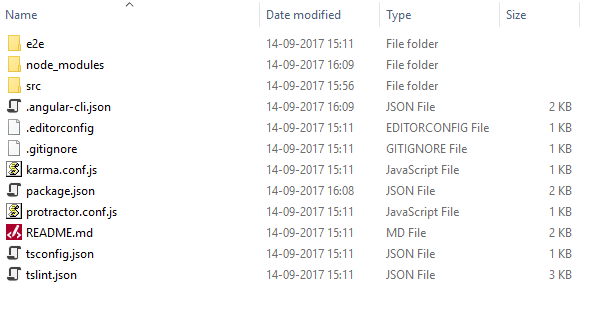
Step 3: Then type cd source file path ((i.e.) cd C:/anguar4gridexampe) in comment prompt
Step 4: Then Install package in your project. just type npm install in comment prompt. it would take some time to install all required package in your project.
Step 5: Once installation done. Then type npm start (or) npm serve to run your project
Step 6: your project not automatically run in your browser window. by default it take 4200 port to run. you are project run in http://localhost:4200/
Demo Output:

If you like this post, kindly share your valuable comments

Tuesday, 12 September 2017
Abstract Factory Pattern
- Abstract factory is a creational design pattern, It define an interface which will create families of related or dependents object without the requirement of specifying the exact concrete classes that will be used.
- This is all about a factory creating various
object at run time based on user demand.
Examples:
Consider you are creating electronic product management application. The first version of your application can handle only mobile phone, so the bulk of your code lives in a mobile phone class.
After a while, your application becomes so popular that you get huge request to include laptop as well. The same time company planning to extend the old product category for client satisfaction. They are planning to extend mobile phone in smart phone & normal phone categories. The same plan to apply new product ((i.e.). laptop) as well. Factory method pattern doesn’t resolve this problem because it involves multiple factories and products which are related to the parent company. To overcome this problem Abstract Factory Pattern come to this place. It allow to create multiple factories & products [(i.e.). products -> product categories -> product sub-categories -> etc…..]
Sample Demo Diagram:
UML Diagram:
Drawbacks: - It support new kinds of products is difficult. Extending abstract factories to produce new kinds of Products isn’t easy. That’s because the AbstractFactory interface fixes the set of products that can be created. Supporting new kinds of products requires extending the factory interface, which involves changing the AbstractFactory class and all of its subclasses.
- It makes exchanging product families easy. The class of a concrete factory appears only once in an application – that is, where it’s instantiated. This makes it easy to change the concrete factory an application uses. It can use different product configurations simply by changing the concrete factory. Because an abstract factory creates a complete family of products, the whole product family changes at once.


Sample Demo Program:
The following participants are involved in given program
- AbstractFactory - Declares an interface for operations that create abstract products
- ConcreteFactory - Implements the operations to create concrete product objects
- AbstractProduct - Declares an interface for a type of product object
- Product=> Defines a product object to be created by the corresponding concrete factory
=> Implements the AbstractProduct interface - Client - This is a class which use AbstractFactory and AbstractProduct interfaces to create a family of related objects
1 2 3 4 5 6 7 8 9 10 11 12 13 14 15 16 17 18 19 20 21 22 23 24 25 26 27 28 29 30 31 32 33 34 35 36 37 38 39 40 41 42 43 44 45 46 47 48 49 50 51 52 53 54 55 56 57 58 59 60 61 62 63 64 65 66 67 68 69 70 71 72 73 74 75 76 77 78 79 80 81 82 83 84 85 86 87 88 89 90 91 92 93 94 95 96 97 98 99 100 101 102 103 104 105 106 107 108 109 110 111 112 113 114 115 116 117 118 119 120 121 122 123 124 125 126 127 128 129 130 131 132 133 134 135 136 137 138 139 140 141 142 143 144 145 146 147 148 149 150 151 152 153 154 155 156 157 158 159 160 161 162 163 164 165 166 167 168 169 170 171 172 173 174 175 176 177 178 179 180 181 182 183 184 185 186 187 188 189 190 191 192 193 194 195 196 197 198 199 200 201 202 203 204 205 206 207 208 209 210 211 212 213 214 215 216 217 218 219 220 221 222 223 224 225 226 227 228 229 230 231 232 233 234 235 236 237 238 239 240 241 242 243 244 245 246 247 248 249 250 251 252 253 254 255 256 257 258 259 260 261 262 263 264 265 266 267 268 269 270 271 272 273 274 275 276 277 278 279 280 281 282 283 284 285 286 287 288 289 290 291 292 293 294 295 296 297 298 299 300 301 302 303 304 305 306 307 308 309 310 311 312 313 314 315 316 317 318 319 320 321 322 323 324 325 326 327 328 329 330 331 332 333 334 335 336 337 338 339 340 341 342 343 344 345 346 347 348 349 350 351 352 353 354 355 356 357 358 359 360 361 362 363 364 365 366 367 368 369 370 371 372 373 374 375 376 377 378 379 380 381 382 383 384 385 386 387 388 389 390 391 392 393 394 395 396 397 398 399 400 401 402 403 404 405 406 407 408 409 410 | using System; namespace AbstractFactory_DesignPattern { //AbstractProduct - Main interface IElectronicProduct { //Common property string Name { get; set; } string Memory { get; set; } string Description { get; set; } //Common Method / Function / Behaviour string GetMemory(); void SetMemory(int value); } //AbstractProduct - 1 interface ILaptop : IElectronicProduct { string WarrantyPeriod { get; set; } string ModelDetails { get; set; } } //AbstractProduct - 2 interface IMobile : IElectronicProduct { string WarrantyPeriod { get; set; } string ModelDetails { get; set; } string PhoneType { get; set; } } //'AbstractFactory' Interface interface IProduct { ILaptop CreateLaptopProduct(LaptopTypeDetails laptopTypeDetails); IMobile CreateMobileProduct(MobileTypeDetails mobileTypeDetails); } //'Product-1' For Laptop class GamingLaptop : ILaptop { private string _name; public string Name { get { return _name; } set { _name = value; } } private string _memory; public string Memory { get { return _memory; } set { _memory = value; } } public string _description; public string Description { get { return _description; } set { _description = value; } } public string _WarrantyPeriod; public string WarrantyPeriod { get { return _WarrantyPeriod; } set { _WarrantyPeriod = value; } } public string _modelDetails; public string ModelDetails { get { return _modelDetails; } set { _modelDetails = value; } } public string GetMemory() { return Memory; } public void SetMemory(int value) { Memory = string.Format("{0} {1}", value, "TB"); } public GamingLaptop() { Name = "HP Omen"; Memory = "1 TB"; Description = "It's famous Gaming laptop in india"; WarrantyPeriod = "1 Year"; ModelDetails = "HP OMEN Core i5 7th Gen -(16 GB / 1 TB HDD/ 128 GB SSD/ Windows 10 Home / 4 GB Graphics) 15 - ax249TX Gaming Laptop (15.6 inch, Black)"; } } //'Product-2' For Laptop class NormalLaptop : ILaptop { private string _name; public string Name { get { return _name; } set { _name = value; } } private string _memory; public string Memory { get { return _memory; } set { _memory = value; } } public string _description; public string Description { get { return _description; } set { _description = value; } } public string _WarrantyPeriod; public string WarrantyPeriod { get { return _WarrantyPeriod; } set { _WarrantyPeriod = value; } } public string _modelDetails; public string ModelDetails { get { return _modelDetails; } set { _modelDetails = value; } } public string GetMemory() { return Memory; } public void SetMemory(int value) { Memory = string.Format("{0} {1}", value, "TB"); } public NormalLaptop() { Name = "Dell Inspiration"; Memory = "2 TB"; Description = "It's famous Gaming laptop in india"; WarrantyPeriod = "1.5 Year"; ModelDetails = "HP OMEN Core i5 7th Gen -(16 GB / 1 TB HDD/ 128 GB SSD/ Windows 10 Home / 4 GB Graphics) 15 - ax249TX Gaming Laptop (15.6 inch, Black)"; } } //'Product-1' For Mobile Phone class SmartPhone : IMobile { private string _name; public string Name { get { return _name; } set { _name = value; } } private string _memory; public string Memory { get { return _memory; } set { _memory = value; } } public string _description; public string Description { get { return _description; } set { _description = value; } } public string _WarrantyPeriod; public string WarrantyPeriod { get { return _WarrantyPeriod; } set { _WarrantyPeriod = value; } } public string _modelDetails; public string ModelDetails { get { return _modelDetails; } set { _modelDetails = value; } } //GSM or CDMA public string _phoneType; public string PhoneType { get { return _phoneType; } set { _phoneType = value; } } public string GetMemory() { return Memory; } public void SetMemory(int value) { Memory = string.Format("{0} {1}", value, "GB"); } public SmartPhone() { Name = "Lenovo Vibe K5 Note"; Memory = "8 GB"; Description = "It's famous Smart Phone in india"; WarrantyPeriod = "2 Year"; ModelDetails = "Lenovo Vibe K5 Note (Gold, 32 GB) (3 GB RAM)"; PhoneType = "GSM"; } } //'Product-2' For Mobile Phone class NormalPhone : IMobile { private string _name; public string Name { get { return _name; } set { _name = value; } } private string _memory; public string Memory { get { return _memory; } set { _memory = value; } } public string _description; public string Description { get { return _description; } set { _description = value; } } public string _WarrantyPeriod; public string WarrantyPeriod { get { return _WarrantyPeriod; } set { _WarrantyPeriod = value; } } public string _modelDetails; public string ModelDetails { get { return _modelDetails; } set { _modelDetails = value; } } //GSM or CDMA public string _phoneType; public string PhoneType { get { return _phoneType; } set { _phoneType = value; } } public string GetMemory() { return Memory; } public void SetMemory(int value) { Memory = string.Format("{0} {1}", value, "MB"); } public NormalPhone() { Name = "Nokia 1600 "; Memory = "256 MB"; Description = "It's famous Normal Phone in india"; WarrantyPeriod = "1 Year"; ModelDetails = "REBOXED Nokia 1600 256 MB Black RAM"; PhoneType = "CDMA"; } } //'ConcreteFactory' class class ElectronicProduct : IProduct { //'Maintain ConcreteFactory-1' public ILaptop CreateLaptopProduct(LaptopTypeDetails laptopTypeDetails) { switch(laptopTypeDetails) { case LaptopTypeDetails.Gaming: return new GamingLaptop(); case LaptopTypeDetails.Normal: return new NormalLaptop(); default: throw new ApplicationException((LaptopTypeDetails.Gaming == laptopTypeDetails) ? "Gaming" : "Normal" + "type can not be created"); } } //'Maintain ConcreteFactory-2' public IMobile CreateMobileProduct(MobileTypeDetails mobileTypeDetails) { switch (mobileTypeDetails) { case MobileTypeDetails.Smart: return new SmartPhone(); case MobileTypeDetails.Normal: return new NormalPhone(); default: throw new ApplicationException((MobileTypeDetails.Smart == mobileTypeDetails) ? "Smart" : "Normal" + "type can not be created"); } } } //'Client' Class class Product { public Product() { Console.WriteLine("Creating Product Factory"); } //maintain laptop products public ILaptop LaptopProduct(IProduct Product, LaptopTypeDetails laptopTypeDetails) { return Product.CreateLaptopProduct(laptopTypeDetails); } //maintain mobile products public IMobile MobileProduct(IProduct Product, MobileTypeDetails mobileTypeDetails) { return Product.CreateMobileProduct(mobileTypeDetails); } } //Different product that can be created by the factory enum ProductDetails { MobilePhone, Laptop, ExternalHardDrive } enum LaptopTypeDetails { Gaming, Normal } enum MobileTypeDetails { Smart, Normal } //main class act as 'Client' class Program { static void Main(string[] args) { IProduct electronicProduct = new ElectronicProduct(); Product product = new Product(); //-------------------------Laptop product---------------------------------------------- Console.WriteLine("------------------------------------------Laptop Products------------------------------------------"); foreach (LaptopTypeDetails laptopTypeDetail in Enum.GetValues(typeof(LaptopTypeDetails))) { var laptopProduct = product.LaptopProduct(electronicProduct, laptopTypeDetail); Console.WriteLine("------------------------------------------{0} Laptop------------------------------------------", laptopTypeDetail.ToString()); Console.WriteLine("Name: {0}, Memory: {1}, Description: {2}, Available Memory: {3}, Contract Period: {4}, Model Details: {5} " , laptopProduct.Name, laptopProduct.Memory, laptopProduct.Description, laptopProduct.GetMemory(), laptopProduct.WarrantyPeriod , laptopProduct.ModelDetails); Console.WriteLine("Do you want to reset {0} memory?", laptopProduct.Name); Console.Write("Press 1 to reset memory: "); if (Convert.ToInt32(Console.ReadLine()) == 1) { Console.Write("Enter Memory Capacity: "); laptopProduct.SetMemory(Convert.ToInt32(Console.ReadLine())); Console.WriteLine("Current Reset Memory Value: {0}", laptopProduct.GetMemory()); } } //-------------------------Mobile product---------------------------------------------- Console.WriteLine("------------------------------------------Mobile Phone Products------------------------------------------"); foreach (MobileTypeDetails mobileTypeDetail in Enum.GetValues(typeof(MobileTypeDetails))) { var mobileProduct = product.MobileProduct(electronicProduct, mobileTypeDetail); Console.WriteLine("------------------------------------------{0} Phone------------------------------------------", mobileTypeDetail.ToString()); Console.WriteLine("Name: {0}, Memory: {1}, Description: {2}, Available Memory: {3}, Contract Period: {4}, Model Details: {5}, Phone Type: {6} " , mobileProduct.Name, mobileProduct.Memory, mobileProduct.Description, mobileProduct.GetMemory(), mobileProduct.WarrantyPeriod , mobileProduct.ModelDetails, mobileProduct.PhoneType); Console.WriteLine("Do you want to reset {0} memory?", mobileProduct.Name); Console.Write("Press 1 to reset memory: "); if (Convert.ToInt32(Console.ReadLine()) == 1) { Console.Write("Enter Memory Capacity: "); mobileProduct.SetMemory(Convert.ToInt32(Console.ReadLine())); Console.WriteLine("Current Reset Memory Value: {0}", mobileProduct.GetMemory()); } } Console.WriteLine("Press any key to exit"); Console.ReadLine(); } } } |
Final Output:

Click here to download sample program
If you like this post. Kindly share your valuable comments.
Subscribe to:
Comments (Atom)